
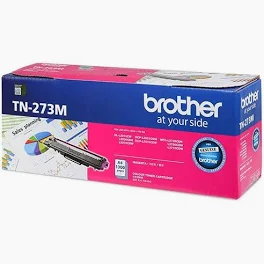
Brother TN-273M Magenta Toner Cartridge
The Brother TN-273M Magenta toner provides high-impact color for all your professional documents. If you want your reports to stand out, this genuine cartridge offers the reliability you need. Furthermore, it works perfectly with your digital laser printer to ensure every page looks sharp.
Benefits of the Brother TN-273M Magenta Cartridge
Selecting the right supplies is essential for printer longevity. Specifically, the Brother TN-273M Magenta toner protects your hardware from the internal damage often caused by generic brands. Consequently, you will experience fewer paper jams and significantly less downtime.
Vibrant Results: This cartridge produces deep, fade-resistant magenta hues.
Efficient Yield: You can print up to 1,300 pages before needing a replacement.
Eco-Friendly Design: Brother offers a simple recycling program for your used supplies.
Technical Specs for Brother TN-273M Magenta
Because compatibility matters, you should always verify your model before purchasing. This Brother TN-273M Magenta toner fits several popular machines.
| Feature | Details |
| Model | TN-273M |
| Page Yield | 1,300 Pages |
| Color | Magenta |
Compatible Printers:
HL Series: HL-L3210CW, HL-L3230CDW, HL-L3270CDW, HL-L3290CDW
MFC Series: MFC-L3710CW, MFC-L3750CDW, MFC-L3770CDW
How to Install Your New Toner
To begin the process, open the front cover of your Brother printer. Next, remove the drum unit and pull the green lever to release the old toner. Afterward, slide the new Brother TN-273M Magenta cartridge into the drum until it clicks. Finally, slide the green tab back and forth to clean the corona wire before closing the machine.
Troubleshooting Your Brother TN-273M Magenta
Occasionally, your printer might display a “Replace Toner” message even after installation. To resolve this, ensure you have seated the cartridge firmly in the drum unit. Additionally, check that the small white gears on the side of the cartridge are clean. If the error persists, try restarting the printer to reset the internal sensors.
In conclusion, using the Brother TN-273M Magenta toner is the best way to maintain professional print quality. Although generic options exist, they rarely match the precision of genuine Brother engineering.



 No products in the cart.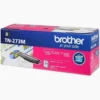
Reviews
There are no reviews yet.